Reporting Services
& SQL Server Barcode
The following implementations are available for barcode generation within Microsoft Reporting
Services and Microsoft SQL Server:
|
|
-
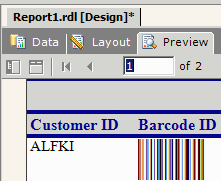 Use
the Reporting
Services Barcode CRI to add dynamic barcodes to Reporting Services 2005 or later with a Custom
Report Item (CRI). Use
the Reporting
Services Barcode CRI to add dynamic barcodes to Reporting Services 2005 or later with a Custom
Report Item (CRI).
- All assemblies provided are 100% managed code created
in C#, time-stamped and digitally signed with
Authenticode certificates.
- Supports multiple Linear and 2D barcode creation for
GS1-128, Code 128, Code 39, Interleaved 2 of 5, PDF417 OneCode, Postnet and Data Matrix ECC200.
-
IDAutomation Barcode Fonts can be used with our
.NET Report Function Custom Assembly file to
formats the data using Visual Studio .NET 2003 and SQL Server 2000 SP 3a
database.
- Functions include Postnet, Code 39, Interleaved
2 of 5, Code 128, UPC-A, EAN-13, EAN-8, UCC-128, MSI
/ Plessey, Code 11, RM4SCC, 4-State, EAN-14, SSCC-18
and SCC-14 barcode fonts and specifications.
- Font tools are free to use and distribute with an
application when in use with a licensed IDAutomation barcode font. Redistribution
of these fonts and components requires, at least, a
Developer License.
- The
.NET
Forms Control and DLL was
created for use with SQL Server 2000 Reporting Services and Visual
Studio 2003. When using Reporting Services 2005
or later, however, consider the
Reporting Services Barcode CRI.
- The
Barcode
Label Software is the best choice when creating
labels pulled from a SQL Server database, and when Reporting Services
is not required.
- The Barcode Image Generator
can be used to create individual barcode images that can be copied and pasted
into Reporting Services. Although not designed
specifically for Reporting Services, it is compatible with multiple applications.
|
|